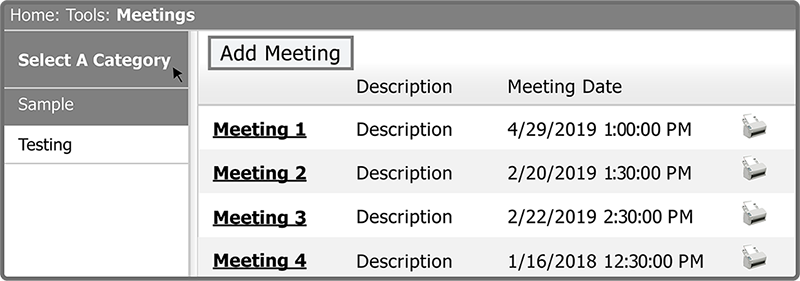
The Meeting Grid has Categories as well as 4 columns — Title, Description, Meeting Date, and Print Icon. You can filter by Category and you can sort by Description and Meeting Date.
| field | description |
|---|---|
| Title | The title for the Meeting. Select this to view the Meeting's details |
| Description | Meeting description. Select the Description header to sort by description |
| Meeting Date | Date of the Meeting. Select Meeting Date header to sort by date |
| Print Icon | Select the Print Icon to print the details of a Meeting |
Note: Meetings are listed by the Newest to Oldest Meeting by default.
Tip: Select the Column Header 3 times to set the sorting back to default.
 Related Topics